Everyone who shoots with DSLRs for video knows the problems with high speed panning, the dreaded “jello vision” or rolling-shutter effect. This is caused by the way the camera’s sensor records the information, top to bottom. As you pan, the image that the sensor starts to record at the top, is shifted slightly to one side by the time the sensor has finished recording the data at the bottom so the subjects appear to bend to one side. But this does not really effect your video if you want to perform a tilt at high speed because relative to the vertical lines on the sensor, the subject is not moving. A couple of days ago I wanted to try out my 300mm f2.8 L IS for filming with my 1dMKIV. I was attending a snowboarding competition and I knew that with such a long lens I was going to need to follow the action pretty fast. Instead of setting up for a standard panning movement, I climbed high above the action and shot a high speed tilt instead, thereby making full use of the cameras abilities and not allowing it’s main weakness to effect my ability to get a cool shot. There is some panning motion in there too but it is a much smaller amount than it would have been if I was side on to the action. Also bear in mind that I have conformed this from 60p to 30p in cinema tools, so the actual speed of tilt was twice as fast as it appears, and the footage held up nicely.
Apologies for the lack of updates in the last couple of week, it’s been busy times here in Whistler. Today I’d like to post some sequences that were shot last year for SBC Skier magazine here in Canada. The first four were to be used for “Trick Tips” , where a pro skier describes how someone would go about performing that trick. The fifth sequence was not shot for that purpose, but it was run as a double page spread so I thought I’d throw it in the mix too. For anyone wanting to know how to create a sequence photo in photoshop I did a video tutorial on this a while back which I will re-post at the bottom of this article. I might re-do this tutorial over the summer to upgrade it to an HD version so if there is anything you want clarification on please leave a comment below so that I can address it in the re-make!
A key rule for shooting a sequence is that you have to be able to see the skier (or snowboarder/biker/skateboarder) ride away cleanly from their trick. This is the first thing that I think about when I want to shoot a sequence. Which angle will allow me to see them ride away? A sequence without the ride away is totally pointless so always think about this first. People often ask if I use a tripod too and the answer is no. You don’t need to if you have a steady hand. Sometimes I will use a monopod if I happen to have one with me but mostly it is all hand held. You will also save yourself hours of photoshopping if you frame the shot to include the start and finish of the riders trick all in one shot. DON’T zoom in on the rider and pan the camera as you will have to spend hours lining up the backgrounds. If you know where the rider is going to take off, and where they are going to land, then frame your shot to include both those points. The advantage of not using a tripod is that if you miss judge the landing point and the rider goes a little bit further than you anticipated you can pan at the last second to make sure you get those landing frames. As I mentioned, you will incur a little extra photoshop time having to line up the backgrounds but at least you will still get the shot.
To make this post a little more interesting I thought I would make a short animation of the sequences using Final Cut. Each frame in the sequence is on a separate layer in the photoshop file so I turned them off in sequence and saved a JPEG of the resulting image and then put them all into Final Cut! CLICK CLICK CLICK!!
Sequence Animation for blog post from Dan Carr on Vimeo.
Kaya Turski in Whistler, BC doing a 360 switch-up at Camp Of Champions. Kaya is the current X-Games slopestyle gold medalist.
Leigh Powis at Whistler Blackcomb with the misty flip off the canon box.
Matt Margetts at Snowpark in Wanaka, New Zealand with a cork 540 tail grab
Mike Riddle at Snowpark in Wanaka,New Zealand with an alley-oop flat 360 in the halfpipe
Dane Tudor at Cardrona in Wanaka, NZ with a hand-drag double cork 900
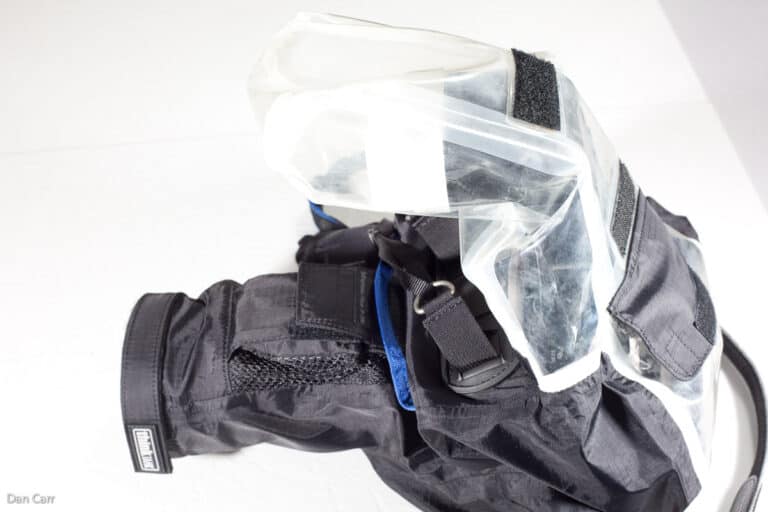
Torrential rain or prolonged periods of snow do not generally go hand in hand with photography and camera equipment. Sometimes it has to be avoided to prevent damage to equipment but sometimes it cannot be avoided while on assignment to cover a particular event. If you find yourself in that situation you might want to think about using a specially designed camera cover such as this very cleverly designed one from ThinkTank Photo. Continue reading »
The day has finally come , and now the clock is ticking for those of us who are running the beta version of lightroom 3. The beta will expire on June 30th and after that point you will have to purchase a copy of Adobes flagship image organizer to continue to use it. Like a lot of people out there I have been testing LR3 for some time and it is a vast improvement over LR2. Earlier in the winter I tried out Aperture 3 as well, but for me Lightroom’s file organization was much better. I don’t profess to be a Lightroom expert but I know what works well for me. You can also download a trial version of the final release candidate and try it for 30 days to help make the decision to upgrade or not and you can also Get 30% off Lightroom 3 when purchased with Photoshop CS5 software
which is a pretty good deal.
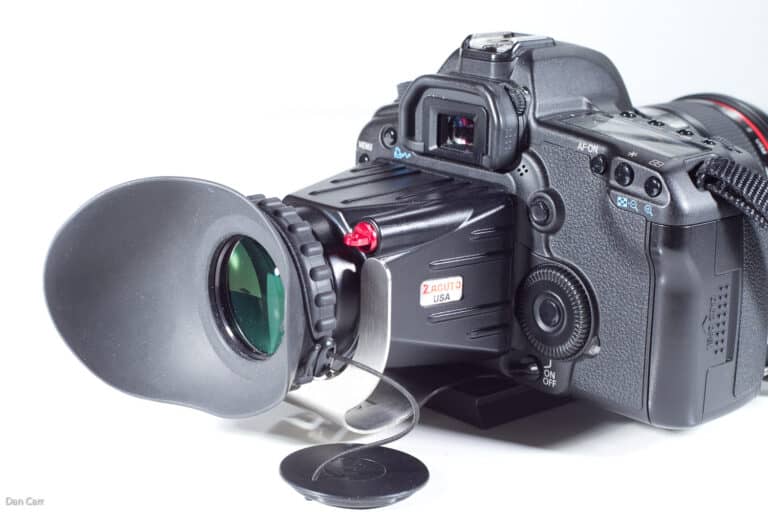
If you have taken more than a passing interest into the video capabilities of your DSLR camera then you will probably have thought about getting some sort of viewfinder for the LCD screen. With the DSLR cameras lacking the ergonomics of traditional video camera design, such viewfinders are probably the most useful accessory to aid video shooting. Not only do they permit easier manual focusing with a clear view of the screen, but they also add stability to hand held shooting with an extra point of contact to your body. Continue reading »
If you shoot video with a Canon DSLR you already know the audio sucks. Or even if you don’t, maybe you have read my guide to audio and microphones for these cameras ! Recording your audio separately is without a doubt the way to get the highest quality audio track but it adds a couple of daunting extra steps to your production. Firstly the simple process of making sure you record the audio and not just the video while you are shooting, 2 record buttons to press! And secondly syncing that audio to your video track in post-production. I guess you could also add in an extra middle process in there of keeping all the audio files organized in a way that you can relate them to the video clips. This all sounds pretty time consuming but for the last year or so lots of people have been singing the praises of a piece of software called PluralEyes from Singular Software. Available as a plug-in for Final Cut, Premiere and Vegas, it takes your the audio track that is associated with your video track and automatically analyzes the waveform to match it up with your second separately recorded audio track. Great if you have one of those 3 editing programs, but consumer video users were left out in the cold. Not any more though…… DualEyes is a new program in beta testing from Singular. And rather than being a plug-in, it is now a totally separate program meaning that anyone can use it all the way from iMovie makers to pros already using Final Cut , but wanting a more streamlined workflow for audio syncing. Take a look at the demo video that they posted on their website, it really looks very easy and would be perfect to use with the new Zoom H1 audio recorder or the H4N.

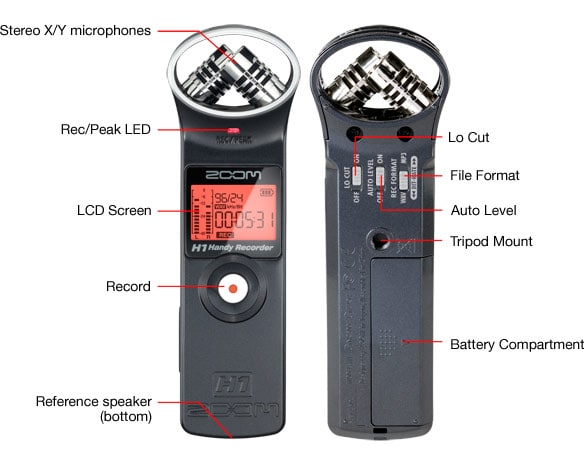
Samson Tech stumbled onto something great with the ubiquitous Zoom H4N audio recorder. When the DSLR video craze kicked off, people quickly realized that whilst the video was stunning to look at, the on-board audio sucked. All professional films use separate audio recorders though, and the HDSLR crowd quickly fell in love with the full featured Zoom H4N. Built in stereo mics and 2 XLR inputs meant 4 track recording was possible in a device that was only $300. Samson was in the right place at the right time with the right price, the H4N was and still is everywhere. But many of the features of the H4N were unnecessary to the “run and gun” photo journalist who just want to record some background audio for a multimedia piece, or just use one extra microphone like a shotgun to get slightly more directional pickup. Well the folks at Samson heard your calls and today announced their first piece of audio gear that was actually designed with DSLRs in mind. The Zoom H1. Continue reading »


Recent Comments