Almost exactly a year ago I posted some information about the RED Scarlet Camera. Since that time there have been a number of “announcements” from the company but most of them have said more or less the same thing. “ The cameras are delayed , but here is some more computer generated graphics of something that might possibly look like the camera when it finally arrives”. I would imagine that Jim Janard and his crew at RED have had to re-think a few elements of their designs in an attempt to combat the surprising success of Canons DSLRs in the video field. Continue reading »
Flash photography can seem like something of a dark art to begin with. Pop-up, hot-shoe mounted, remote, fill and bounce; there are many ways a photographer can use flash to control the exposure and look of a photo. It is more complicated than ambient light photography so before you begin experimenting, make sure you have a good understanding of all the basics of exposure; shutter speed, aperture and ISO.
In ski photography, flash is used in two key ways. Firstly, as a substitute for ambient light for instance shooting rails at night, or tree skiing on a cloudy day.  And secondly as “fill flash†to supplement the ambient light and fill in dark shadow areas where strong sunshine is creating undesirably high contrast or “harsh†light in the image.
If you have a DSLR then you will almost certainly have a pop-up flash. These are of very limited use for shooting action photos though. Partly because of the lack of control you are given over the settings, and partly because they are very low powered and only have a useful range of about 10ft. Up to this distance you can successfully use them for fill flash on static subjects but if you are serious about taking good photos then you need to buy a separate flash. Your camera won’t know that you are shooting action so be wary of it’s automatic use of the pop-up in some situations. It’s better to turn it off completely until you know that you need it.
With a hot-shoe mounted flash you are beginning to have the necessary control needed to start shooting some ski photos. These flashes have extremely complex “brains†inside them that evaluate the necessary flash output depending on the light situation. If you always have your flash set to automatic though, you will never learn anything new and I guarantee you that you are not getting the best possible photo.
Whatever type of flash you use, your camera will limit your shutter speed to around 1/250th or slower. For an evenly lit subject, the entire burst of light from the flash needs to occur during the fraction of a second that the shutter is completely open. This maximum shutter speed is called the x-sync and using a speed faster than this can result in a photo that displays dark bands of un-flashed areas. Some hot-shoe mounted flashes have a “ high speed sync†mode that does allow the flash to sync with the shutter at faster speeds. This is achieved by greatly reducing the power output of the flash, which in-turn shortens the duration of the flash burst. Less power means you need to get much closer to your subject so whilst it’s good to know how to use this mode, it’s not always the answer and careful setting of your camera and flash settings can often yield a better result.
In flash photography you effectively control two exposures at the same time. The first is the ambient light exposure, controlled by your shutter speed. The second is your flash exposure controlled by your aperture or by adjusting your flash power. As the shutter curtains open to fully reveal the camera sensor, your flash fires to “paint†your skier into the scene with a burst of light. The duration of this flash is much faster than the shutter speed though so the remaining time after the flash burst has fired, is left for the ambient light to “paint†in the background of the photo before the shutter curtains have fully closed. The action in the photo is frozen by the burst of light from the flash, and not by your shutter.
A single on camera flash is convenient, and a good starting point, but once you have mastered that the next step to creating professional looking shots is to learn about off-camera lighting. With today’s technology, the number of off camera flashes that you can add to a scene is almost endless. Radio transmitters attach to the camera and send a wireless signal to a receiver that mounts to your flash, allowing you to place it exactly where you want to capture the best shot. Many of my ski photos use 5 or more flashes synced to fire simultaneously and some guys take it even further than that. That much equipment is beyond the realms of most enthusiastic photographers but you can create incredible photos with careful placement of only one or two strobes. Learning to use off-camera flash creates those angles between the light and the camera that introduces shadows and texture to the scene, helping you to get a more realistic and three-dimensional look.
Techniques for multiple flash use and more information on x-sync and flash duration will appear in a separate article on this site in the near future.
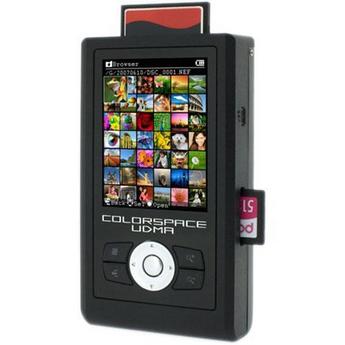
This past Autumn I was in Mexico on holiday. I took my newly purchased Canon S90 camera with me and was having a great time snapping pics with that little thing. The quality of the shots coming out of that tiny thing was really blowing me away. I wasn’t traveling with a laptop computer so my photos remained on the camera’s memory card. Unfortunately, on the fifth day of my trip, my camera was stolen while I was in a restaurant. This was the first time I have ever lost photos and I was truly gutted, more so than I ever thought I would be. I didn’t give the camera a second thought, but all I could think about was all the photos I had just lost. When I got back home I started to look into some possible solutions to this problem in the future. Sometimes it’s just not practical to travel with a laptop, so how do you keep your photos safe? Continue reading »
Continuing on with my Snow photos 101 section, by far the most common question in my in-box is “what camera or lens should i get?”. You can view the equipment that I use HERE, but this doesn’t mean that you need all of this to make some great ski or snowboard photos.
Lenses
A professional ski photographer will own lenses that range from a 15mm fisheye all the way up to a 300mm telephoto lens. Different shooting situations require different setups and they aren’t necessarily all carried at the same time. By far my most used lens is my 70-200mm zoom lens so something in that range would be a wise choice. When you are deciding which equipment to invest in, bear in mind that camera technology is evolving at a frantic pace. Whichever camera you choose now, will be outdated in a years time. Lens technology on the other hand moves at a much more sedate pace. Very little has changed over the last 10 years aside from the addition of image stabilization to a few lenses. It therefore makes sense to spend as much as you can on your glass, if you treat it properly a good lens can last you a decade. Typically you will see a more noticeable improvement in image quality by using higher quality glass, than you would with using a more expensive SLR camera.
Picking a single lens that covers the whole focal length range you need is not the best solution. The larger the zoom range the lesser the image quality so try and split it up into at least 2 or 3 lenses. A wide-angle zoom such as a 17-40mm or 18-55mm and then a telephoto zoom in the 70-200 range will have you covered for most things. Once you have mastered these, you can add specialized lenses to your lineup, like a fisheye or large aperture prime lens like the 50mm f1.8. Prime lenses, those with a fixed focal length, will always yield a sharper photo than their zoom counterparts, but most ski photographers value the portability of a few zooms over a large collection of primes.
Cameras
What camera should I get? There is no one right answer to this question; a good photographer can make a good photo with almost any camera. Don’t get sucked into the megapixel race though, the majority of images you see in ski or snowboard magazines up to 2009 will have been shot at either 8MP or 10MP and as you will have seen, that’s more than enough for most users. I would however recommend sticking to the 2 big brands, Nikon and Canon. Both companies make exceptional sports cameras for professional users and many of the features filter down lower in their product line for beginner and advanced photographers.
Readers of SBC Skier in Canada this year will have seen my series of ski photography tips. I have decided to put together a new section on my blog which initially starts off with the beginner tips featured in SBC Skier and then moves on further to more advanced information for readers looking for a a little more in-depth info. Every few weeks I will add a new section to the tips until I have covered the things that most people ask me about. Hopefully by the end there will be a good collection of information for people to reference.
We will start with the basics and gradually move on to more advanced subjects where I will expand on things a bit further for those wishing to delve a little deeper.
If your ski photos look flat and the snow looks featureless, try shooting them early in the morning or late in the afternoon when the sun is lower in the sky. This will create shadows on the snow and reveal details and textures that are not apparent when the sun is overhead at midday. On a clear day much darker and richer colors will come out in the sky.
For the same reason, try to avoid having the sun directly behind you when you shoot. Creating an angle, even a small one, between you and the sun will introduce more contrast into the brighter areas of your shot by revealing shadows behind objects such as snow drifts, ridges, trees and even individual crystals of snow.
A common miss-conception is that you should never shoot into the sun. Whilst that might apply to some aspects of photography, it can be a great way to bring a dramatic look to your ski photos by creating a back-lit spray of powder or a silhouette against the sky.
Composition
The rule of thirds states that compositional elements and points of interest in a photo should be aligned with either the lines or the intersecting points of an imaginary 3×3 grid on top of your photo (figure 1).
Composing your photos in this way will usually create nicely balanced images that are easier on the eye. From figure 1 you can see that the centre of the photo contains no intersection and no line. A common mistake is to put your subject right in the centre of the photo but aesthetically this rarely works well. Try lining up horizons with one of the horizontal lines or putting your skier subjects at the intersecting points and you will come away with a much more pleasing image.
The “Rule of Thirds†is not a rule at all though; it’s a guideline. Depending on the content of the image, there might be cases where you can make a good image without it but if you are uncertain how to compose a shot, it’s a great place to start. You can also try and look for lines in the natural environment that will draw the eye towards the intended subject of your photo.
Exposure
Most people have experienced taking a picture of a beautiful snowy scene only to discover that the photo they see on the back of the camera looks dark, dreary and gray. Cameras are designed to expect an average scene with an average brightness and the huge amount of light reflecting off snow goes far above that expected value. The camera will often under-expose the shot, mistakenly thinking that the shot is overly bright when in fact there is just a lot more reflected light than an average situation.
Some smaller cameras have a “snow setting†hidden away in the menu, be sure to use this if your camera doesn’t have any manual settings. If you are using an SLR camera and shooting on semi-automatic settings like aperture or shutter priority, you can use your cameras “exposure compensation†function to dial in an adjustment to your exposures. The adjustment will vary depending on the brightness of the day so experiment and try to understand how your camera reacts do different situations, every camera is different. Learning how to read the histogram on the camera will let you know when you have nailed the exposure correctly.
(The use of the histogram and the theories behind light metering go far beyond the scope of this first article. If you are seeking more information please read my longer essay on the subject, available on the website in the coming months.)
Remember photography is about being creative; there are very few hard and fast rules, only guidelines. Get out there, experiment and have fun but these few simple tips will get you off to a good start.
Since the beginning of November Whistler has received 493cm of snow, and it’s still falling. This has smashed the previous record for November with 10 days still to go. Originally the mountains were due to open next weekend on the 27th but with the heavy snowfall early in the month, Whistler Blackcomb pulled out all the stops to get some lifts turning for everyone a few weeks early. Thanks for all the hard work guys!
A couple of days ago I headed up the mountain with Jeff Thomas from Poorboyz, Mike Henitiuk, TJ Schiller and Riley Leboe as they begun filming for the new movie. Overnight there had been 2ft of snow to add to the already impressive coverage and it continued to fall all day. This is the 7th winter that I have skied at Whistler Blackcomb but I can honestly say that was as good as it gets. Bottomless powder. In fact it was almost too much, the alpine is yet to open so we were left skiing mid mountain lines in the Garbanzo zone. With that amount if snow you need some steep pitches to maintain speed and it was a struggle to keep moving as the snow piles up above your waist. We hunted around the same zone all day and eventually found some nice pillow lines for the guys though.
The long range forecast for this place is equally impressive, looking like we will smash well through the 500cm mark in the near future which would account for half of Whistler’s average annual snowfall in just one month. It’s a pleasant surprise to be back into winter work so early and if this is a sign of things to come this year it’s going to be one to remember.
Big thanks to the Whistler Blackcomb PR guys and girls for hooking our crew of riders up so we could get out there and start to document this crazy weather!
UPDATE: Here is a sneak peak from Poorboyz with intro from yours truly.
This post is sort of a prelude to a review that i’ll be writing in the next couple of weeks. Recently the folks at IKAN sent me one of there v5600 to test out while I have been shooting some video with my 7d and 5d. When I started to take down some notes I realized that there are a few things to be said about using external monitors with these cameras and some of them are characteristics of the cameras and therefore independent of the type of monitor you are using. I found myself trying to figure out what was caused by the camera and what was the monitor so In order to not confuse the review at all, here are some things worth knowing……
A nice surprise in my mail box this morning. I knew about this for a couple of weeks but today was the first time I have seen the finished product. This is my 8th cover but my first one in N.America so i’m really pleased with this one.
Max Hill is the man on the cover and the shot was taken last April in Whistler, BC. I had the idea for this shot about 3 years ago but that year at the time we didn’t have the snow for it. Last year there was plenty in the spring time so finally got to make it happen. When I took Max and Leigh Powis to this spot and explained that I wanted them to jump over a railing, hand plant on it AND grab their ski they looked at me as if I was mad. Once they’d given it a couple of attempts though and built a small jump to pop them over the railing it didn’t take any time at all. I think this shot was only about the 4th or 5th time that Max hit it.
Shot with a Canon 1dMKIIN , 15mm Fisheye , 1/250th , f7.1, ISO 250. Lit with 1 Elinchrom Ranger and 4 Nikon speedlights all triggered with pocketwizards.
I have made a quick lighting diagram for those interested in that sort of thing. Click for larger
I hadn’t taken the time yet to try shooting 60fps with my Canon 7d. But it started to snow heavily in Whistler village this morning and as I watched out of the window it looked like the perfect chance to try it out. I put the Canon 85mm 1.8 lens on the 7d and opened my front door to get a few shots.
I had mistakenly thought that creating nice slow motion shots with the footage would just be as simple as dropping the 60fps clips into a 30fps timeline in Final Cut Pro. Actually that’s not the case though. Doing that just drops every other frame and you end up with regular looking footage and simply setting the clip speed to 50% does not take advantage of all those 60 frames you just shot. I did a quick search on the net and found a good tutorial by Philip Bloom. I can only speak for Mac users here I’m afraid but the solution is pretty easy so long as you have Final Cut Studio.
If you have FC Studio you will also have a program called Cinema Tools. Fire it up and hit command+O to open a clip. The clip will open in a video viewer and on the right hand side will be a button that says “Conform”. Clicking on this will bring up a drop down box with various frame rates in it. Select the one you want (29.97 for example) and then hit “Conform”. The transformation is instant and requires no rendering, all that is being modified is an internal part of the file that denotes how the video is played.
WARNING: This process is not reversible. Once you hit the “Conform” button there is no going back so I highly recommend that you do this process to a copy of the original file. I created a sub folder called SlowMo inside the folder containing my original files. Then whenever I found a file that I needed to conform, I copied the original to that folder, Conformed it and then imported it into Final Cut Pro. Don’t forget that you will also need to transcode the 7d files from H.264 before you do anything. Make sure you transcode the files before you conform them in Cinema Tools!
I shot about 10 quick shots from my door to have some footage to test this with and the result is below. Winter is nearly back!! Click though to the vimeo page to watch it in HD.
Winter’s Coming – Whistler, November 7th 09 – 60fps 7d from Dan Carr on Vimeo.
I was hoping to have a lengthy review of the Canon S90 having recently taken it on vacation to Mexico. Unfortunately the camera was stolen 2/3 through my stay there. I will get a replacement but the review will have to wait a bit. Sadly I had taken a few hundred photos with it before it was taken, which would have been perfect illustration of this cameras abilities. C’est la vie i guess. My experience with the S90 was overwhelmingly positive though. Truly a pocket-sized camera unlike the G10 or G11. I was continually amazed by the quality of the shots I was getting and also the accuracy of the exposure metering in even the most complex of lighting situations. Flash exposure with backlit subjects was particularly impressive.- After the unexpected popularity of the Cliff Trampoline video (thanks to all that posted it on various websites) I have uploaded a full sized 1920×1080 version to my smugmug account. For those with sufficiently fast internet connections, you might want to check it out. Smugmug still has to do a fair amount of compression as their max file size is 600mb but nonetheless it is still pretty impressive. CLICK HERE FOR 1080P VERSION
- Some readers might have noticed that I now have a Facebook page for people to follow. If you are a regular Facebook user then this might be a good way for you to keep up to date with what i’m up to. I regularly post photos to that page that I do not post on here as it is simple and quick to do so. You can find the Facebook page HERE
- The famous underwater surf housing manufacturer SPL have started selling
their new housings for the Canon 7d. HERE Looks great, especially with the Tokina 10-17 lens on board. Should be a decent choice for surf photogs out there. Wish i had an excuse to buy one….. - As I begin to see more of a use for video in my work I have been experimenting a bit with some more equipment. I wanted to construct some sort dolly to see how it looked with the Canon 7d and 5dMKII. With a bit of research on the internet I came across a type of do-it-yourself tripod rail system nicknamed the “ZaZaSlider”. I purchased the raw parts for it and constructed it today. Below if a few test shots to see if i was heading in the right direction. It seems to work pretty well but needs a bit of tweaking. Once I have it fully dialled i’m going to do a full post on how to make one and what parts you are going to need. I wasn’t going to post this as it was really just for me to see how it was working but i thought why not…. no particular editing going on here but you can get an idea for whats going on. Its a very portable solution which can be carried if I am skiing. More info in coming weeks once I have refined things a bit more. This was shot with the 7d by the way, not the 5d
ZaZa slider 1st test footage. from Dan Carr on Vimeo.
- Lots of people asking about the 7d too and I’m working on writing down some thoughts about that within the next couple of weeks. Also stay tuned for reviews of some more video equipment that i’m testing out this week.
- I feel like posting a photo too as this is a photography blog after all. This is a shot of Charley Ager that was in last months issue of SBC Skier in Canada. Shot in Whistler BC with the Poorboyz crew.

Canon 1dMKIIN, 200mm on a 70-200 f4L IS 1/1250 , f7.1
Highlight and copy the HTML below, then paste it into the code for your Web site.
[ Highlight HTML ]

[ Highlight HTML ]
Canon PowerShot S90IS 10MP Digital Camera with 3.8x Wide Angle Optical Image Stabilized Zoom and 3-inch LCD
[ Highlight HTML ]


Recent Comments